

In the world of SEO, we usually hear about on-page and off-page terms. Of course, they are different. Each of them has a different purpose and its own method.
This article discusses the definition of on-page SEO, its important elements, and how to optimize each element so that your website has a better ranking in search engines.
What is On Page SEO?
On-page SEO is an optimization technique performed directly on a website to make it easier for search engines (like Google or Bing) to understand the content of your website. Its primary focus are content, HTML structure, and user experience.
In contrast to off-page SEO which relies on external factors, on-page SEO is completely under the control of the website administrators/owners.
On-page SEO optimization helps search engines understand a page’s topic more accurately. As a result, the related page has a better chance of ranking higher in search results (commonly called Search Engine Results Page or SERP in SEO).
In addition, on-page SEO also improves visitor experience through relevant, structured, and easy-to-read content.
Important Elements in On Page SEO
On-page SEO has at least 7 elements that we can optimize, including:
- Keywords
- Heading
- Content
- URL/slug
- Meta title & meta description
- Internal links
- Images
By optimizing each of those elements above, your website will have the opportunity to rank higher in search engines and compete with other websites within the same search terms.
Optimization of On Page SEO Elements
Optimizing each on-page SEO element shouldn’t be done haphazardly or else the content won’t display optimally in search engines and will simply waste your time and effort.
This optimization will refer to Google’s SEO Starter Guide document, therefore the steps below are highly reliable and trustworthy.
1. Keywords
In the document, keywords are also referred to search terms. These elements are the most important element in on-page SEO because they need to be placed in almost every other elements.
If you want to look for keywords for your content, one of the ways is by using the Keyword Planner from Google Ads.
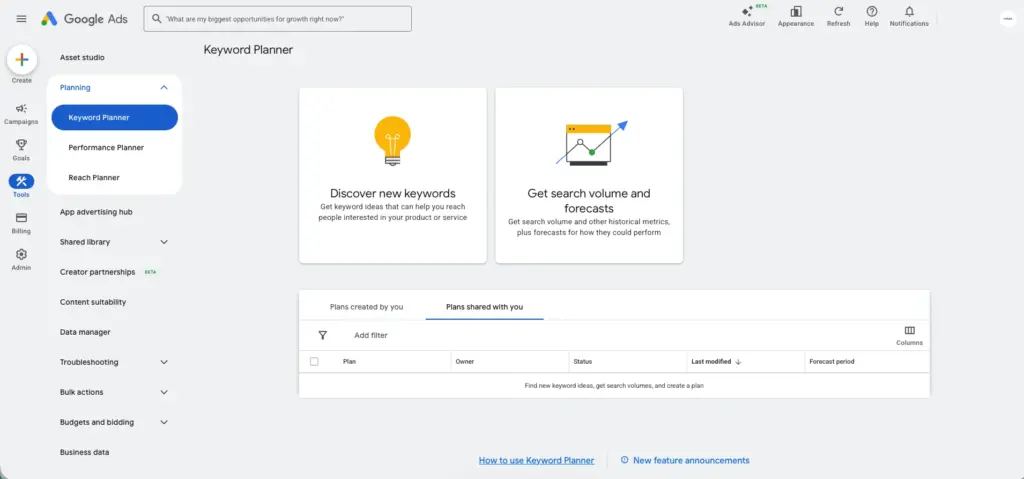
There are some tips which you can use when you look for keywords using tools like Keyword Planner, especially when you just developed your website, they are :
- Find relevant keywords to your website
- Target long tail keywords
- Find keywords which have high monthly average search (reaching up to 1k)
- Target low competition keywords
This image below is the example of a keyword which follows the tips above :
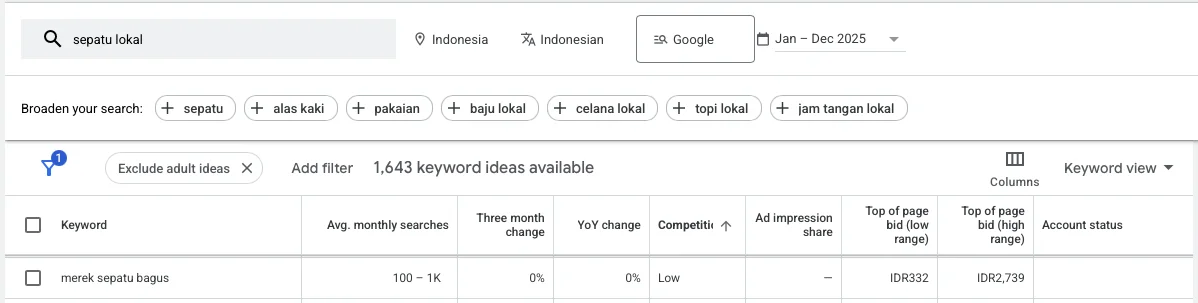
The keyword of “merek sepatu bagus” has an average monthly search volume of 100-1k with low competition. You can definitely use this keyword for your content if your business is in the related field.
It should also be remembered that in a content, keywords should not be used excessively because they can have negative impacts on its quality.
Keywords also need to be readable and feel natural with the sentences and words they are connected to.
2. Heading
Headings here refer to titles, subtitles, their subs of subtitles, and so on. These elements are the key points of a content. Using keywords in headings wisely will help your readers understand the context.
If your website uses WordPress, usually the SEO plugin will suggest inserting keywords in Heading 1 to Heading 3. For a more practical implementation, you can check this complete guide on WordPress SEO to see a broader optimization strategy.
Regarding the order of heading placement, Google’s SEO Starter Guide document doesn’t really emphasize the order. However, Google explicitly states that having a good heading order will provide a fantastic experience for readers.
Google also doesn’t specify the ideal number of headings a piece of content needs. Just use them sparingly.
3. Content
Page content writing can be started after you’ve determined the key points you want to cover. Here are some tips from the SEO Starter Guide for creating engaging and useful page content for readers:
- Readable and well-organized text : Make sure the text has enough contrast with the background color. Additionally, for relatively long content, you can divide it into headings or sections to help readers understand the context easier.
- Unique : Make sure your content is unique. Remember that you’re competing with other content for the same keywords in a search engine.
- Not outdated topics : Make sure your content is up-to-date. If not, remember that you can always update your website’s content.
- Reliable and trustworthy : You can include reliable sources to make your content more trustworthy for readers.
The challenging thing about this element is to balance the SEO needs with user experience.
Sometimes, writers need to be clever about how to avoid repetitive keywords, which can bore readers, while still adhering to good SEO principles.
4. Meta Title and Meta Description
Meta title and meta description are sentences that will appear in search engines which will represent your page.
The following image is an example of a meta title and meta description :
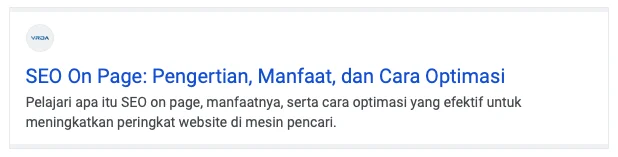
The top part in blue with larger font size is the meta title, while the bottom part in black font color is the meta description.
Here are the best practices for writing meta titles based on Google’s SEO Starter Guide document :
- Be descriptive and concise : Avoid using ambiguous words like “Home” or “Profile” for meta titles. Also, ensure the meta title isn’t too long, as search engines will automatically truncate the title to fit the width of user’s device.
- Avoid keyword repetition : It’s not recommended to use keywords repeatedly within a single piece of content. Titles like “Foobar, foo bar, foobars, foo bars” look unattractive to readers and risk being read as spam by search engines.
- Unique : Different pieces of content on the same website should have different meta titles. Having the same meta title on different pieces of content on the same website will cause confusion for both readers and search engines.
- Use the appropriate language : If the page is in English, the meta title should also be in English. Search engines will attempt to match the meta title to the language of the associated content.
Here is an example of good meta titles :
<title>ExampleSocialSite, a place for people to meet and mingle</title>

or

<title>ExampleSocialSite: Sign up for a new account.</title>
As for writing meta descriptions, here are the best practices :
- Unique : Just like meta titles, meta descriptions should also differ from one piece of content to another on the same website.
- Relevant to the content : Treat the meta description as a summary of the content you’ve created. This summary should entice readers to click on your content over other content targeting the same keyword.
- Don’t use keyword lists : Using keyword lists will disrupt the reader’s experience. Meta descriptions should use keywords, but they shouldn’t display a list of targeted keywords.
Here is an example of good meta descriptions :
<meta name="description" content="Get everything you need to sew your next garment. Open Monday-Friday 8-5pm, located in the Fashion District.">

or

<meta name="description" content="Self-sharpening mechanical pencil that autocorrects your penmanship. Includes 2B auto-replenishing lead. Available in both Vintage Pink and Schoolbus Yellow. Order 50+ pencils, get free shipping.">
Meanwhile, the following is an example of bad meta descriptions :
<meta name="description" content="Sewing supplies, yarn, colored pencils, sewing machines, threads, bobbins, needles">

or

<meta name="description" content="Mechanical pencil">
5. Slug (URL in On Page SEO)
A slug is a URL commonly managed in on-page SEO and generally contains targeted keywords. This part of the slug will then be displayed as a breadcrumb in search engines.
In Google’s SEO Starter Guide document, it is stated that the use of URLs needs to be descriptive because Google automatically learns the content from breadcrumbs.
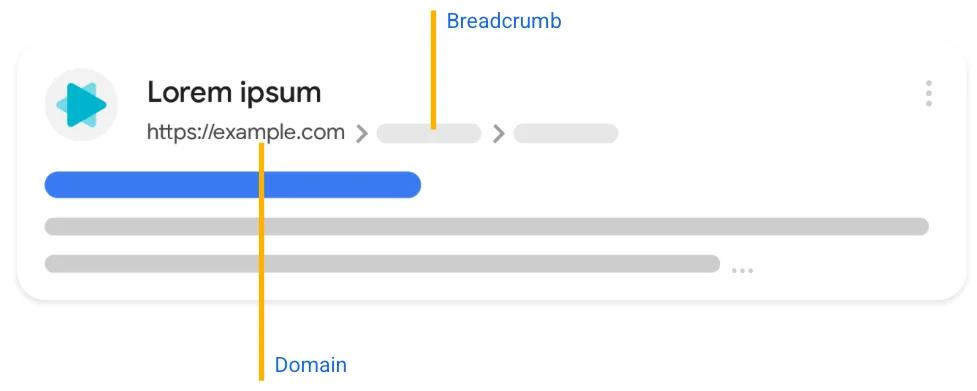
Here is an example of a URL that is good for both readers and search engines :
https://www.example.com/pets/cats.htmlMeanwhile, the following is an example of a bad URL :
https://www.example.com/2/6772756D7079206361746. Internal Links
Internal links are links that connect one page to another. These links serve to improve user experience and surf your website longer.
It needs to be remembered that internal links should be relevant to the topic, and pages that get internal links from other pages will tend to be more easily detected by search engines.
There are several tips from Google’s SEO Starter Guide document regarding the inclusion of internal links, including :
- Descriptive : Don’t use text for internal links that is too general, such as “Learn More,” “Read More” and so on.
- Concise : Text on internal links should be read naturally and shouldn’t be too long.
- Not adjacent to each other : If you want to include multiple internal links in a single paragraph, make sure the words before and after the internal link correlate with the link. Don’t place one internal link directly next to another.
Here is an example of good internal links :
For a full list of cheese available for purchase, see the <a href="https://example.com">list of cheese types</a>.

or

Starting next Tuesday, the <a href="https://example.com">Knitted Cow invites local residents of Wisconsin</a> to their grand re-opening by also offering complimentary cow-shaped ice sculptures to the first 20 customers.
Meanwhile, the following is an example of a bad internal link :
We have an <a href="https://example.com">article</a> that provides more background on how the cheese is made.

or

Starting next Tuesday, the <a href="https://example.com">Knitted Cow invites local residents of Wisconsin to their grand re-opening by also offering complimentary cow-shaped ice sculptures</a> to the first 20 customers.
7. Images
Images can increase reader engagement with website content. Images within content can be optimized by ensuring they are high-quality, relevant, and have appropriate alt text.
However, even if high-quality images are required, they still need to be compressed. Ensuring images are in the correct size and converting them to WebP format can be a solution.
Additionally, place images within text that’s relevant to the image. This text will then tell search engines what the image is about.
Alt text also needs to be adjusted to the targeted keywords. Don’t leave image alt text blank.
The following is an example of good alt text :
<img src="puppy.jpg" alt="Dalmatian puppy playing fetch"/>Meanwhile, the following is an example of bad alt text :
<img src="puppy.jpg"/>

or

<img src="puppy.jpg" alt="puppy dog baby dog pup pups puppies doggies pups litter puppies dog retriever labrador wolfhound setter pointer puppy jack russell terrier puppies dog food cheap dogfood puppy food"/>
Make sure your website’s on-page SEO is optimized.
On-page SEO is the main foundation in SEO optimization strategies on a website.
With proper keyword management, quality content, and good page structure, the chances of getting a higher page ranking in search engines will be higher as well.
As a WordPress-based website development agency, VRDA will certainly help you develop a website that is optimized for on-page SEO.
We use quality tools/plugins to support your website to have a higher ranking in search engines.
We believe consistent on-page SEO optimization not only helps organic traffic, but also increases the credibility of the website in the long term.