


Knowing the current WordPress version is essential for maintaining a secure, fast, and future-ready website.
On the December 2nd, 2025, the community finally launched its latest WordPress version which is WordPress 6.9.
This version focuses on improving editor productivity, collaboration, and overall user experience.
It continues WordPress’s shift toward a faster, more flexible, and more intuitive content management system.
Whether you manage a personal blog or a business website, WordPress 6.9 offers practical improvements you can feel immediately.
Let’s dive into some of the newest features in this WordPress recent version.
Navigate Easier with Command Key/Palette
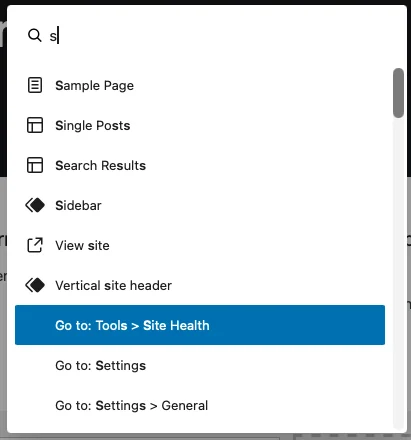
WordPress 6.9 introduces a global Command Palette, allowing users to quickly navigate pages, create content, and execute actions using keyboard shortcuts.
This significantly speeds up workflows, especially for power users.
You can access this feature by pressing Command + K (mac) or Control + K (Windows).
Give Feedbacks using Add Note for Blocks
With Add Note feature, users can leave comments directly on specific blocks inside the editor.
This feature is especially useful for teams, enabling clearer feedback and smoother collaboration without external tools.
To access it, you just need to choose the block, and click block options.
You will then find Add Note inside the options.
After adding note, your team will be able to read it and give feedback as well as mark it as resolved.

Better User Experience with New Content Blocks
WordPress 6.9 adds several new blocks designed to enhance content presentation:
- Accordion Block for collapsible content sections
- Time to Read Block to display estimated reading time
- Math Block with LaTeX support
- Term Query and Term Count for improved taxonomies, user experience, and on page SEO.
These additions will help you create your own website more professional, informative, and engaging.
Also read : Website Design Checklist: 15 Steps to a Professional Website
Some Other Features in the Current WordPress Version
Smoother Editing with Improved Drag & Drop
The block editor now offers more intuitive drag and drop interactions with clearer visual indicators.
Building layouts feels smoother and more precise, even on complex pages.
Focused Enhancements for WordPress Developers
For developers, WordPress 6.9 introduces updates like the Abilities API, laying groundwork for better extensibility and future AI-driven integrations.
These changes improve how themes and plugins communicate capabilities across the WordPress ecosystem.
Overall, This Latest WordPress Version Improves Performance and Accessibility
The recent WordPress version 6.9 includes backend and frontend optimizations such as on-demand block CSS loading and improved cron handling.
Additionally, dozens of accessibility fixes make the editor and dashboard more inclusive and easier to use.
How to Check Your WordPress Version Current Status
To check if your site is already using WordPress 6.9:
- Log in to your WordPress dashboard
- Open Dashboard → Updates
- Your WordPress version current will be displayed at the top
If an update is available, upgrading should be a priority.
But don’t forget to always backup your website before doing an upgrade.
Why You Should Always Use the Latest WordPress Version
Running the latest WordPress version, especially WordPress 6.9, helps ensure that your website:
- Stays protected against known vulnerabilities
- Works smoothly with modern themes and plugins
- Delivers better performance and usability
- Remains aligned with ongoing WordPress development
For professional and business websites, staying updated is a best practice.
Final Thoughts
The current WordPress version, WordPress 6.9, is a well-rounded release that improves productivity, collaboration, and performance.
From the Command Palette to new content blocks and better editor interactions, this WordPress new version is designed to make website management more efficient and enjoyable.
Keeping your site on the latest version of WP ensures it remains secure, optimized, and ready for future growth.